 Store Bounty
01 / Store Bounty Rider
Give riders the delivery details they need
Keep package information, pickup instructions and customer contact details with each delivery.
See the setup steps
Store Bounty Rider
Keep pickup details, the customer’s address and phone number in the rider’s app. Check delivery history afterwards.
01 / Store Bounty Rider
Keep package information, pickup instructions and customer contact details with each delivery.
See the setup steps02 / Store Bounty Rider
Riders use their own app to choose a store, set availability and see assigned deliveries.
See the setup steps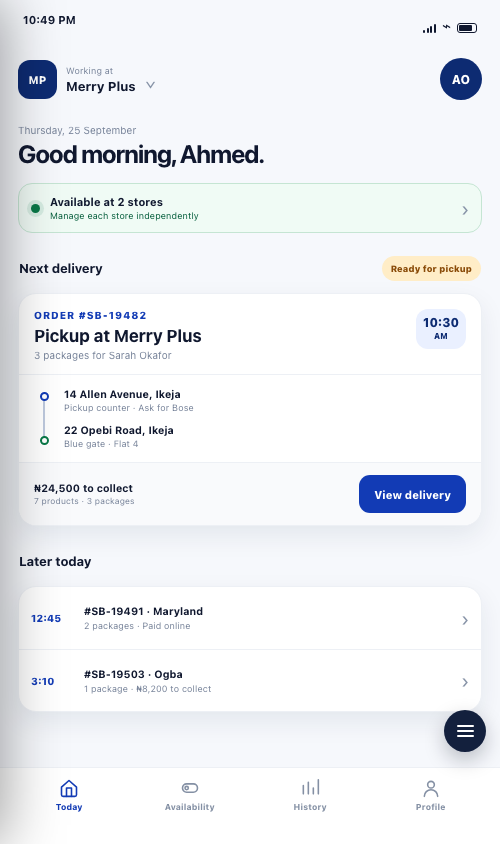
03 / Store Bounty Rider
Review delivery history by date after the order has been handed over.
Ask us about setup
Connect a rider to the store, manage availability and assign the order. Package information, customer address and phone number give the rider the context needed to collect and deliver.
Use the configured pickup and customer handover steps for the assignment. Code verification can follow the store's setup and the choices made for that delivery.
Riders can review delivery history by date and switch between associated stores. Directions to pickup and to the customer help the rider move through the assigned job.
The rider uses a separate app designed around assigned deliveries. Store access and invitations connect the rider to the merchant.
The app includes store selection and availability by store. The rider can see which store they are working with.
Tell us what you sell, how many stores you have and which phones, computers or printers you use. We’ll help you choose a setup.
Keep exploring


